Lock Up Properly: A Shutdown Order for the Office Network Before the Christmas Break

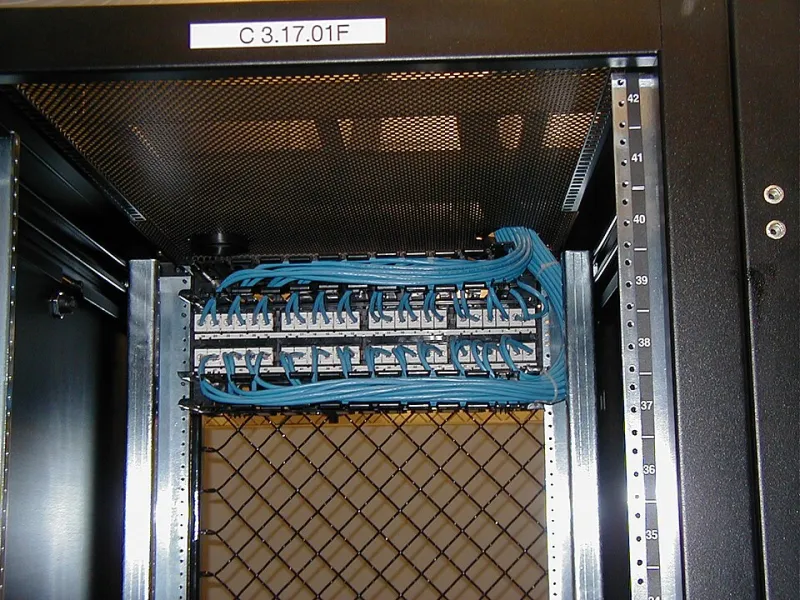
Photo: U.S. Government Accountability Office, Public domain, via Wikimedia Commons
Every January, someone opens a shop or an office after the break, flips the big red switch, and then stands in front of a rack of blinking amber lights wondering which one is meant to be doing that. The kit is usually fine. The order was wrong, or nobody wrote down what was plugged into what in the middle of December.
This is a short, do-it-now plan for the week before you close. It assumes a typical small site: a router or firewall, a switch, a NAS, a handful of access points, a card terminal or two, a CCTV recorder, a UPS, and an alarm.
First: decide what has to stay alive
Not everything should go off. Work out what the business needs over the break, and write it down before anyone starts unplugging.
- The intruder alarm and fire system stay on. Always. Do not switch off a circuit to 'save a bit of power' without knowing exactly what is on it.
- CCTV usually stays on. Check your insurance wording — many policies expect recording to continue over a closure period. It is also the fortnight when an empty building is most interesting to the wrong people.
- The card terminal is a judgement call. Most terminals should be left powered so they can settle and pick up remote configuration. If your provider says otherwise, follow that, and do a manual settlement before you lock up either way.
- Anything with a remote monitoring contract — a leased line, a managed firewall, a fridge alarm — needs to keep running, and you should tell the provider you are closing so they do not log a fault when traffic drops to zero.
- Anything on-premises that takes calls needs thinking about. If your phone system lives in a cupboard, switching it off takes your number with it unless you have divert set up in the cloud.
Back up before you power anything down
Do the NAS backup, and then do the bit everyone skips: check that the backup finished and that the file you actually care about is in it. Export the router and switch configuration to a file and email it to yourself, or drop it on a USB stick that leaves the building with you. Photograph the front and back of the rack, with the labels visible. Five minutes now saves an hour on 4 January.
The shutdown order
- Stop the services. Close tills, settle the card terminal, eject any USB drives, and make sure nobody is mid-upload.
- Shut down the NAS and any servers properly, from the interface, not the button.
- Shut down PCs and printers. Printers left on for a fortnight attract dust and occasionally decide to update themselves.
- Switch off access points and the switch. Power down the PoE load before you power down the switch feeding it, not after.
- Router or firewall last of the network kit. This is the one that keeps its own housekeeping tidy if it goes down last.
- Then the UPS. Press the off button on the UPS itself rather than yanking the plug. Leave it plugged into the wall so the battery stays topped up, and note the date you did it.
Label anything you unplug with a strip of tape and a marker, even if you are sure you will remember. You will not remember. The cleaner will not know.
Things that quietly go wrong over a closed fortnight
A cold building is a dry building, and dry air plus dust plus a fan is how you get a switch that sulks in January. If the heating is off and the plant room drops close to freezing, condensation on cold kit that is suddenly powered up is a real risk — let the room come back to normal before you switch anything on.
Also check the UPS battery age. A three-year-old battery that has never complained will often fail its first self-test after a quiet fortnight. If it is near the end of its life, replace it now rather than discovering it during a power cut in February.
The restart order that avoids a January morning of blinking lights
Come back in this sequence, with ten minutes between the big steps:
- Mains and UPS on. Let the UPS settle and finish its self-test.
- Router or firewall. Wait for the internet light to go solid.
- Core switch, then check the uplink.
- NAS and servers, and confirm they have picked up their addresses.
- Access points, so they get a stable address rather than racing everything else.
- Card terminals and tills last, once the network is definitely up. They re-register faster when the rest of the world is already awake.
If something does not come back, resist the urge to factory reset it. Nine times out of ten it is a cable in the wrong port or a DHCP pool that filled up while you were away.
Leave a note for January
Write a one-page sheet: what was switched off, what stayed on, the order to bring it back, the Wi-Fi password, the broadband account number and the phone number of whoever installed it. Laminate it and stick it inside the comms cupboard door. The best network documentation is the kind that survives a fortnight of nobody thinking about it.